

Turn meetings into action
SmartMeetings, AI meeting notes built into Birdie. Record a supervision, appraisal or team meeting, and get back a structured summary with the follow-up actions ready to confirm.


The supervision should end when the meeting does
Supervisions, appraisals and spot checks are some of the most important conversations you have with your team. Then there's the write-up. Handwritten notes typed up in the car, at the kitchen table, or back at the office at the end of a long day. And the actions you agreed in the room become a line in a document that someone has to remember to chase.
SmartMeetings does the write-up for you, and turns what you agreed into work your team can track in Birdie.
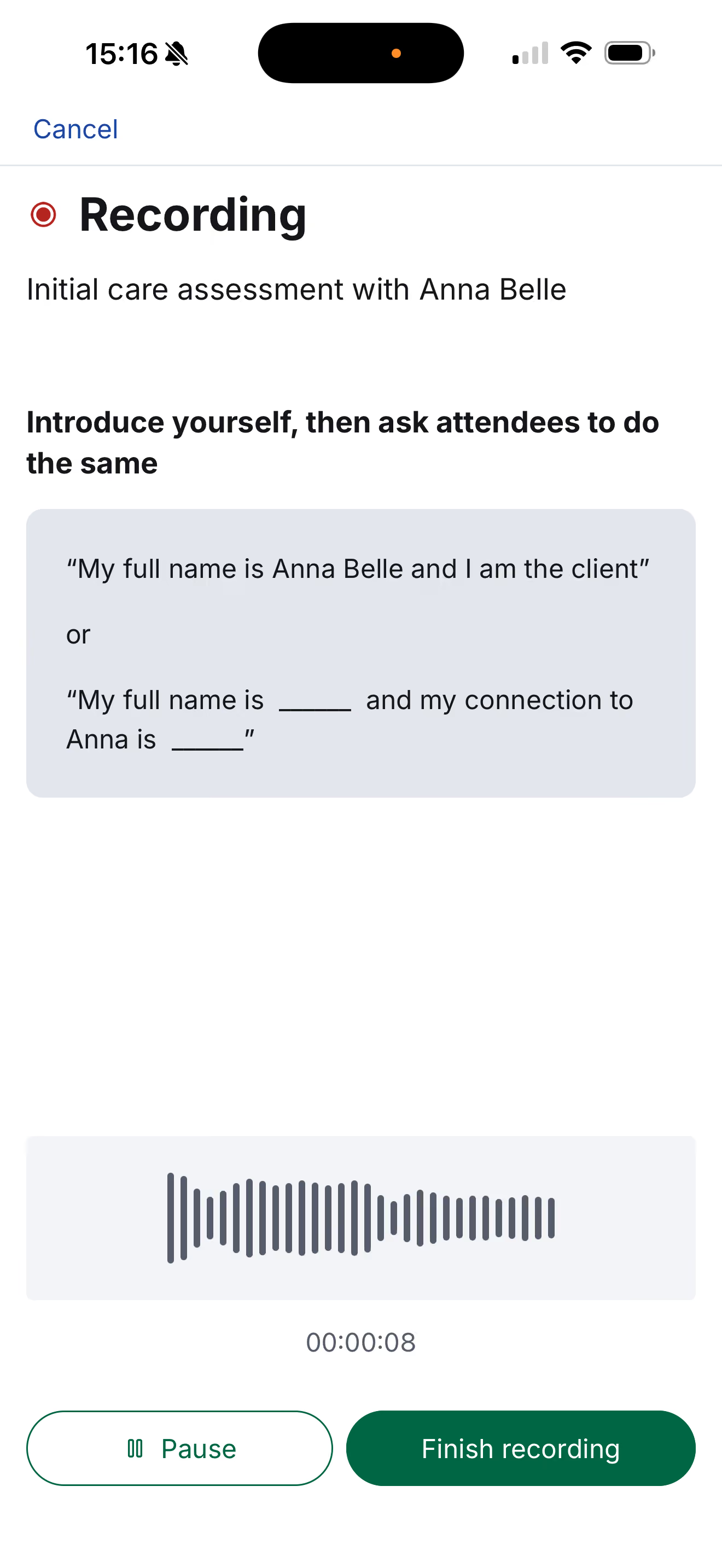

Record the meeting in the Birdie app
Tap the microphone in the Birdie app, choose the meeting type and who it's with, and check everyone is happy to be recorded. Then hold the meeting the way you always do. You can pause at any point, so anything said off the record simply isn't captured.

SmartMeetings writes it up
Once the recording uploads, SmartMeetings transcribes the conversation and writes a structured summary, using a template built for that type of meeting. The summary, transcript and audio are waiting for you in the Meetings tab in the Agency Hub.
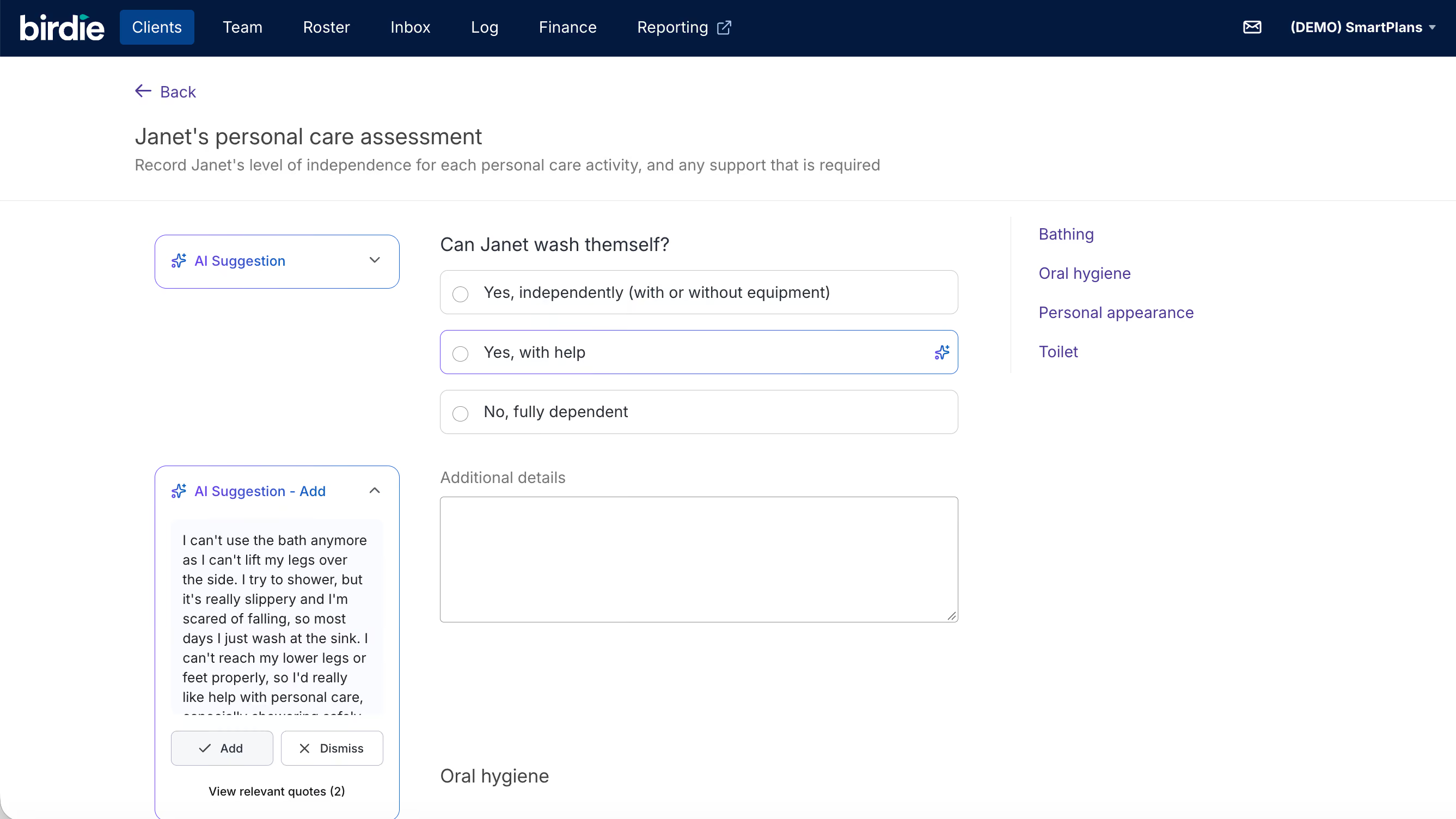
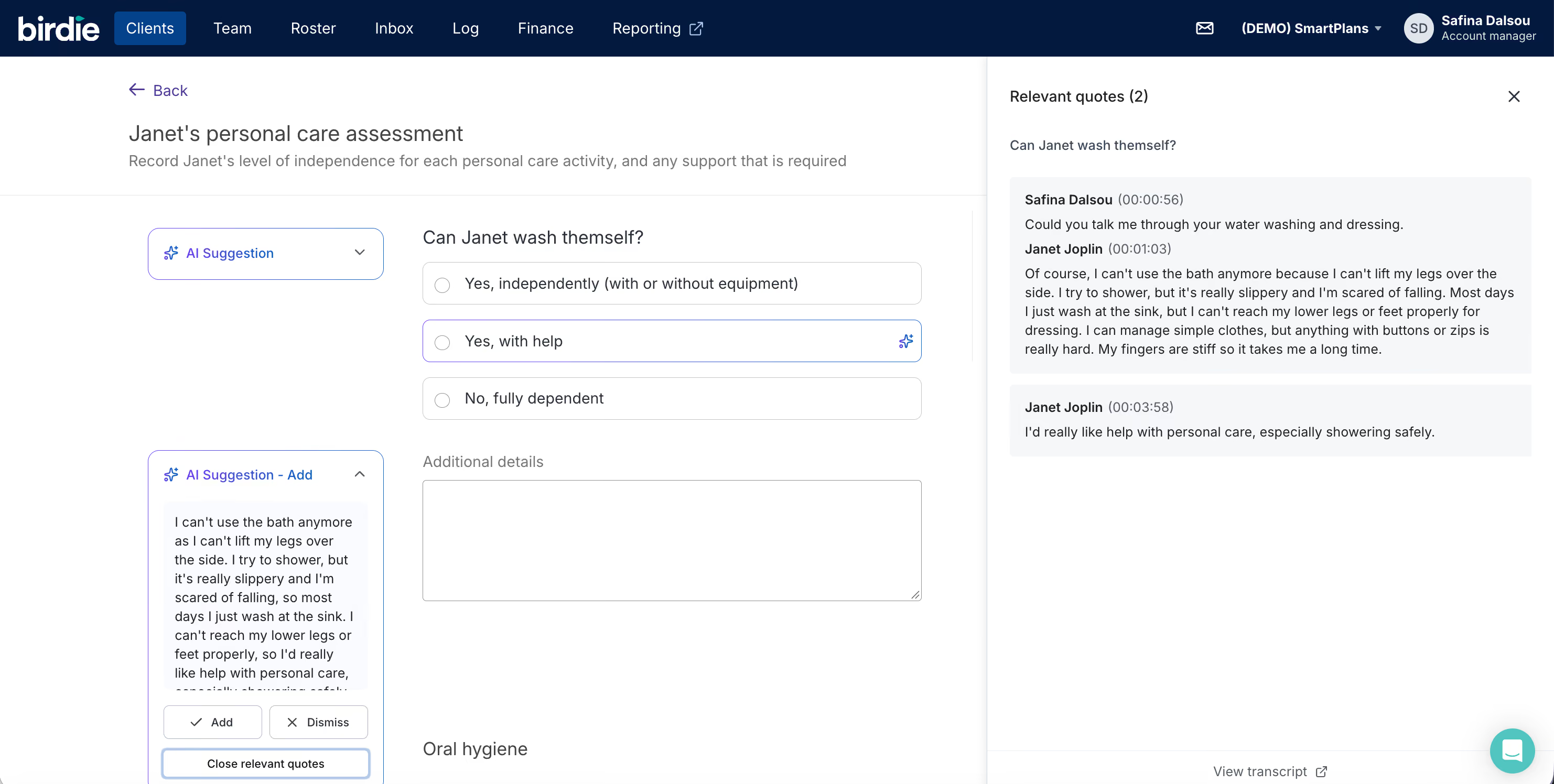

Review it, then turn it into action
Read the summary, make any edits, and mark it as reviewed. Nothing counts as a record until you have. Then go through the suggested actions: create the ones you agreed and they land in your Birdie Inbox with a due date, linked to the carer or person the meeting was about. Dismiss the rest.
Hear from our partners

“SmartMeetings is absolutely brilliant. The transcriptions are professional and accurate, and the summaries are short and include exactly what I need. I've recorded nine meetings this month and it's saving me somewhere between 30 and 45 minutes on each one.”


"When you give your staff your time, they feel valued and they're more likely to stay. It's just a massive knock-on effect. I don't know how we lived without SmartMeetings."

Not just another AI note-taker
A transcription tool gives you a transcript. SmartMeetings gives you a reviewed record and actions your team can track, inside the system you already run your care on.
| Standalone AI note-takers | SmartMeetings | |
|---|---|---|
| Where it lives | A separate app, with its own login | In the Birdie app and Agency Hub your team already uses |
| The write-up | One general summary, whatever the meeting | A template for each care meeting, so a supervision reads like a supervision and a spot check like a spot check |
| Agreed actions | A list in a document that someone has to chase | Tasks in your Birdie Inbox, with a due date, linked to the carer or person the meeting was about |
| Into your records | Copied across by hand | Already on the record. Nothing to copy across |
| Checking it | Usually sent out as soon as the meeting ends, before anyone's checked it | You check and edit it before it counts. Your name and the time go on it, and every edit is kept in the version history |
| Your data | Held by another supplier, on their terms | Held within Birdie. Audio is deleted after 60 days |
Ready to see SmartMeetings in action?
Book a demo with the Birdie team. We'll show you the full platform and how SmartMeetings fits the meetings you already run.
Already a Birdie partner?
Head over to the SmartTools trial page instead.

Two tools, one promise
SmartMeetings is one of Birdie's SmartTools, alongside SmartPlans. Both work the same way: record the conversation, Birdie writes it up inside the record, and nothing is saved until you've confirmed it.
SmartMeetings
You're on this page
SmartMeetings turns a recorded supervision, appraisal, spot check or huddle into a structured summary with actions that land straight in your Birdie Inbox.
Supervisions, appraisals, spot checks and huddles
A summary written for that type of meeting
Confirmed actions land in your Birdie Inbox with a due date
A record an inspector can trace end to end
Reviewer timestamp and version history on every meeting
SmartPlans
SmartPlans turns a recorded first assessment into a care plan, with each answer cited back to what was actually said.
Care plan answers waiting when you open the assessment
Each answer cited to what the person said
High-risk clinical questions are always yours to write
You confirm every answer before it's saved
Works in the Birdie app your team already uses

Our philosophy: AI in plain sight
We believe AI in care should work the way care professionals work: transparently, collaboratively, and accountable to the people it serves. This means every AI feature Birdie builds follows three key principles:

Visible: The whole circle of care – not just the care manager, but the carer and client – can see how AI is being used.

Explainable: If a client can't understand the role of AI in their care, we shouldn't be using it.

Controllable: Decisions stay in human hands, where they should always be.
Frequently asked questions
Isn't AI too risky for clinical assessments?

That's why we built SmartPlans the way we did. For high-risk clinical questions, you write the answers yourself. For complex judgements, SmartPlans highlights relevant quotes, but you write the answer. Only standard, lower-risk questions get an AI suggestion, and you must review and confirm every single one. It's smart assistance, not dangerous automation.
We already use another transcription tool.
How does SmartPlans compare?
We've heard that with standalone tools, you save time recording but then spend it searching and copy-pasting into Birdie. SmartPlans solves this: it's built directly into your workflow, and the whole team can access transcripts, which isn't always possible with other systems.
What about data privacy and GDPR?
SmartPlans is built with data privacy as a core principle. All data is held securely within the Birdie platform in line with GDPR, not on third-party servers. Crucially, your data is never used to train any AI models.
What will the CQC think of this?
SmartPlans is designed to support CQC compliance. It feeds directly into Birdie’s assessment templates, which are built to align with CQC standards. By providing a clear, auditable trail from the initial conversation to the final care plan – with every answer cited back to the source – SmartPlans helps you demonstrate that your process is safe, effective, and responsive.
My team isn't confident with technology.
Will they be able to use SmartPlans?
If your team can use the Birdie app, they can use SmartPlans. You hit 'record' before the conversation and 'stop' when you're done. The AI works in the background, so when you open the assessment, the information is already there for you to review.

Get your write-up time back
Book a demo to see how Birdie turns your supervisions, appraisals and team meetings into reviewed records and tracked actions.
Lorem ipsum dolor sit amet, consectetur adipiscing elit. Suspendisse varius enim in eros elementum tristique. Duis cursus, mi quis viverra ornare, eros dolor interdum nulla, ut commodo.


99.9% uptime
99.9% uptime
99.9% uptime
99.9% uptime